The purpose of this mini project is for you to practice analyzing complicated categorical variables where there is no finite list of possible responses that can be listed. When individuals have the ability to respond in sentences, we often get variables that are hard to analyze since every response is going to be unique since. The data we are going to look at is AirBnB review data from the city of Boston. The data was downloaded from Kaggle.com but the original source of the data is http://insideairbnb.com/get-the-data/. Because of this, you are not allowed to use any AirBnB data in your final project. The data is loaded in R and previewed in the code chunk below. Even the variables that are classified as “integer” or “int” are really categorical variables.
If you see “#DO NOT CHANGE”, these lines of code are designed for you to run and examine, but do not change them in any way.
reviews=read.csv(file="reviews.csv",header=T)

str(reviews)
## 'data.frame': 68275 obs. of 6 variables:
## $ listing_id : int 1178162 1178162 1178162 1178162 1178162 1178162 1178162 1178162 1178162 1178162 ...
## $ id : int 4724140 4869189 5003196 5150351 5171140 5198929 6702817 6873023 7646702 8094418 ...
## $ date : chr "2013-05-21" "2013-05-29" "2013-06-06" "2013-06-15" ...
## $ reviewer_id : int 4298113 6452964 6449554 2215611 6848427 6663826 8099222 7671888 8197342 9040491 ...
## $ reviewer_name: chr "Olivier" "Charlotte" "Sebastian" "Marine" ...
## $ comments : chr "My stay at islam's place was really cool! Good location, 5min away from subway, then 10min from downtown. The r"| __truncated__ "Great location for both airport and city - great amenities in the house: Plus Islam was always very helpful eve"| __truncated__ "We really enjoyed our stay at Islams house. From the outside the house didn't look so inviting but the inside w"| __truncated__ "The room was nice and clean and so were the commodities. Very close to the airport metro station and located in"| __truncated__ ...In each section, I will ask you to do something with this data. Below you will find links of reading material that I used in the creation of this assignment. You still may need to read the documentation of packages or R functions or search for help online. I expect you to do this assignment on your own without the help of another human or the use of AI tools like ChatGPT. If you get help from another student or use something like ChatGPT on this assignment, you will receive a 0 and be reported.
Helpful Reading Material:
If every review was written by the same person, we would have a serious problem. If all the reviews were written by 10 different people, we would have a serious problem. It is important that we investigate the number of reviews by each reviewer.
First, I want you to calculate/count the number of reviews from each
reviewer based off the reviewer_id. Instead of showing
these calculations/counts, I want you to use a histogram to show the
distribution of the number of reviews from individual reviewers. Use
geom_histogram() to create this histogram.
Also, on the visual, I want you to add text using
geom_text()to show your audience the average number of
reviews in your sample of reviewers, the median number of reviews in
your sample of reviewers, and the proportion of all unique reviewers who
wrote exactly 1 review. I want to see these statistics written inside of
the histogram. Round your values to 2 decimal places.
See the example image named hist_ex.png in the folder to see
exactly what I am looking for. I want your x-label and your text to
match mine. Your numbers and/or histogram may be different. Use a font
size of 8 in geom_text() and try to choose coordinates that
put the text in the top right near mine with the mean over the median
over the proportion. Your coordinates will not be identical to mine. My
advice is to consider code that looks like
geom_text(x=?, y=?, label="?",size=8). You need to figure
out how the function works to change the question marks
appropriately.
Also, when I knit, I get a message that prints about the “bins”. I
don’t want to see this in your html file. Use the code chunk option
message=FALSE to suppress this message.
#Below I give you a vector called example which
contains four strings. Suppose I wanted to create a binary vector called
hello that shows 0 when the string doesn’t contain the
word “hello” and 1 when the string does contain the word “hello”. I can
use the str_detect() function to return “TRUE” or “FALSE”
depending on whether or not the pattern “hello” is detected. The
function as.numeric() converts “True” to 1 and “False” to
0. However, in the code below you will notice that the only 1 is for the
second string where the “h” is lower case.
I want you to create your vector hello by using
functions applied to the vector example. You can modify
the code I have given you below. Your vector should result in
c(1,1,1,0). Print your vector hello so it
shows in your output. If you just write hello = c(1,1,1,0)
and then you print this out, I want the grader to take off 1 more point
than the question is worth since this is nonsense.
I just want to say, there are many ways you can do this. I would recommend converting example to lower case. This is a strategy often seen in text analysis, and I now that you know the strategy, I trust that a simple Google search can fill in the gaps. If you completely erase my code, and use different functions to do the same thing, you will not be penalized.
example = c("Hello, I am here","I like to hello", "I HELLO when I HELLO","I like jello") #DO NOT CHANGE

hello = as.numeric(str_detect(example,"hello"))

hello
## [1] 0 1 0 0Sometimes it is helpful to count the number of letters or the number of letters that are capitalized.
IF I WRITE LIKE THIS IT IS PROBABLY BECAUSE I HAVE ANGER ISSUES AND NEED HELP.
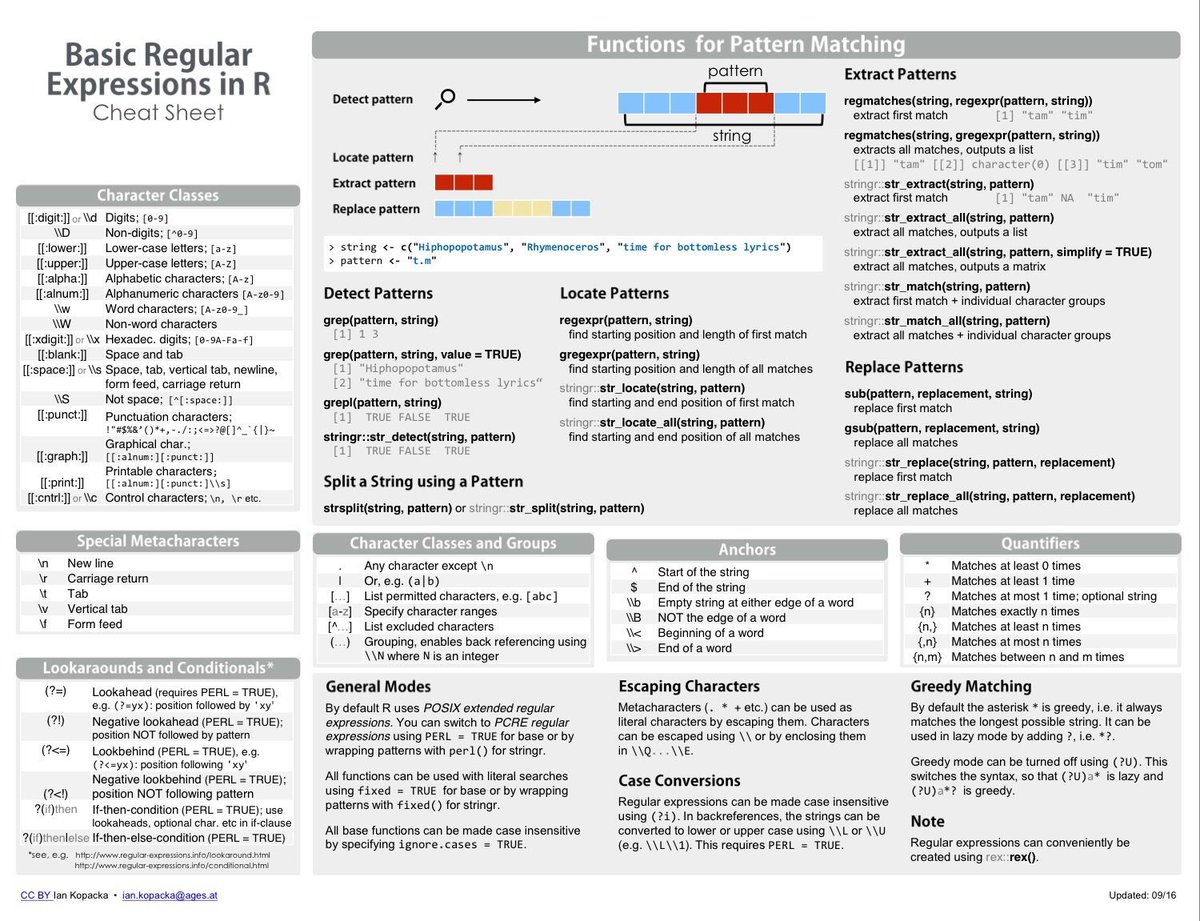
I am going to give you examples using strings with numbers. I am showing you how to count the total number of alphanumeric characters and the number of digits. See the links for information on regular expressions to get ideas on how my code can be manipulated for example2.
I want you to create a vector named num_letter which returns a numeric vector of the number of letters (lower case or upper case) for each string in example2. Letters are the characters from a to z and from A to Z. I don’t want you to count punctuation.
I also want you to create a vector named num_allcap that returns a numeric vector of the number of capital letters in the string which would just be the characters A to Z.
Then, print out the vectors num_letter and
num_allcap to confirm that your code worked. Again, you
can count the letters or capital letters and create vectors using the
c() function, but if you do this, the grader is going to
take off 1 more point than the question is worth in the rubric, because
THAT NONSENSE WILL BE CONDEMNED. I would hand count to know what the
correct answer is, but please use functions in R applied to
example2 to do this. I give you examples of what I am
looking for. If you completely erase my code, and use different
functions to do the same thing, you will not be penalized.
example2 = c("I love teaching.",
             "I LOVE teaching and I am weird.",
             "I LOVE TEACHING ... NOT." ) #DO NOT CHANGE

num_letter = str_count(c("swag345","42money42"),"[[:alnum:]]")
num_allcap = str_count(c("swag345","42money42"),"[[:digit:]]")

num_letter
## [1] 7 9num_allcap## [1] 3 4I want you to think of 4 words that have positive connotations when seen in a review, and 4 words that have negative connotations when seen in a review. For example, I might pick the word “Lovely” for a postive word, and “Disgusting” for a negative word. You should look through the comments variable in the reviews dataset to get an idea of the type of language commonly seen in reviews. Do not use the words that I give as examples and write the words in the list below by replacing WORD1, WORD2, …, WORD4 with the words you chose written in lowercase. For my example, I would write “lovely” and “disgusting”. (Don’t write your words in quotations and don’t choose the words I gave you)
Now, I want you to create a dataframe called reviews2 based off the reviews dataset which adds variables that have the same names of the words you chose and wrote above. Each positive word variable should be binary (0 or 1) indicating if the positive word is in the comment. For example, I would create a variable called “lovely” which is 0 if the word “lovely” is not in the comment and 1 if the word “lovely” is in the comment. For the negative word variables, I want it to be (0 or -1) indicating if the negative word is in the comment. The value of -1 for the word “disgusting” would indicate that, yes, the word “disgusting” is in the comments.
The code colSums(reviews2[,7:14]) sums up the columns
for the 8 new variables. I want you to run this code at the end, and
this should be the ONLY output. If you pick a word that DOESN’T EXIST in
any of the 68,275 reviews, you need to pick a different word.
#Now, I want you to create a new dataset called reviews3 based off reviews2. Add variables to your dataset called num_letter and num_allcap that measure the number of letters and the number of capitalized letters in the comments. However, I also want you to create a variable called prop_allcap which measures the proportion of the letters in each comment that are capitalized. Think about why I the proportion would be more useful than just the count.
The code colMeans(reviews3[,15:17],na.rm=T) takes the
average of the three new variables. I want you to run this code at the
end, and this should be the ONLY output.
#Answer the following questions in the space provided in complete sentences. For these questions, I think there is an ideal answer, but there may be other good answers if defended well or explained. Each question is worth 2 points. You will lose 1 point if there is bad grammar or a lack of complete sentences anywhere.
PLACE ANSWER HERE IN COMPLETE SENTENCES.
PLACE ANSWER HERE IN COMPLETE SENTENCES.
PLACE ANSWER HERE IN COMPLETE SENTENCES.
In this section, I want you to read recommended reading material
about creating word clouds. We have 68,275 different comments from
different people. When I followed the step-by-step instructions on the
website to create a word cloud, I ran into an error due to the size of
vector being 28 Gigabytes. Because of this, I want you to randomly
sample 10,000 of the 68,275 comments and make a word cloud. I want the
word cloud to only contain words that occurred at least 500
times. I also want to see a word cloud with a maximum of 200 words.
You will need to convert your vector of comments to a corpus(list of
texts) so that you can clean the data using the tm library
in R. For example, we need to remove numbers, punctuation, and useless
words like “a”, “and”, “the”, etc.
The sample() function in R can be used to sample 10,000
comments. For example, sample(1:10,5, replace=FALSE) can be
used to randomly choose, without replacement, 5 numbers out of a bag
that contains the numbers 1 through 10. The code I give you below
samples 50 out of the first 1000 comments in the original dataset named
reviews. Since we are randomly sampling, I recommending
using the set.seed() function in R to ensure that every
time you knit the document, you get the same random sample of 10000
comments.
After you figure out how to make the word cloud using the vector of
50 comments in sample_reviews, you should modify the
sample() function so that you are sampling 10,000 random
comments. The only output from this code should be your word cloud.
Remember, I only want words that occur at least 500 times in the sample
of 10,000 comments, and I only want a word cloud with 200 words or less.
You should use the code chunk option warning = FALSE to
suppress warnings about the word cloud not being able to include words
in the word cloud due to limitations. In my solutions, I did the basic
round word cloud from library(wordcloud), but you may do
more advance things with other word cloud packages as long as you follow
my instructions.
#library(wordcloud)
#library(RColorBrewer)
#library(wordcloud2)
#library(tm)

set.seed(3456)
sample_reviews = reviews[sample(1:1000,50,replace=FALSE),]$commentsMake a visual that you think would be useful that involves summing up your binary positive variables and summing up your binary negative variables. I am expecting you to create two new variables only based off the 8 variables you created.
#Make a visual to summarize the change in something overtime. I am expecting the x-axis to represent time (year, month, etc.), and the y-axis could be anything. I want you to convert the date variable which is currently a chr variable to an actual date variable. You can create other new variables that you think are interesting here.
#Make a visual that compares listings that are exceptionally bad listings that are exceptionally good. How you define exceptionally good and bad is up to you. I would definitely think about this: Would it be fair to say a restaurant is exceptionally bad because 5/10 reviews are bad? Critically, think about the visual you create, but the audience should see the worst listings and the best listings so they know the disparity between what is good and what is bad. This is another situation where creating other variables would be very useful and show creativity.
#| Task | Points |
|---|---|
| Reviewers: Histogram | 2 Points |
| Reviewers: x-Label | 1 Points |
| Reviewers: Text in Top Right | 1 Points |
| Reviewers: Correct Font Size | 1 Points |
| Reviewers: Correct Numbers | 3 Points |
| Reviewers: No Message | 1 Points |
| String Lesson 1 | 2 Points |
| String Lesson 2 | 2 Points |
| Apply Lesson 1: Modified Bullet Points | 2 Points |
| Apply Lesson 1: Four Positive Vars Created Correctly | 2 Points |
| Apply Lesson 1: Four Negative Vars Created Correctly | 2 Points |
| Apply Lesson 1: Output Doesn’t Contain 0’s | 1 Points |
| Apply Lesson 1: Showed Output | 1 Points |
| Apply Lesson 2: Matching Output for Each Variable | 3 Points |
| Questions: Correct/Acceptable Answers | 6 Points |
| Questions: Complete Sentences and Proper Grammar | 1 Point |
| Word Cloud:Correct Code for Sampling | 2 Points |
| Word Cloud:Relevant Code for Word Cloud | 2 Points |
| Word Cloud:Word Cloud is in Output | 3 Points |
| Word Cloud:No Warnings in HTML File | 2 Points |
| Creative Visual 1 | 2 Points |
| Creative Visual 2 | 2 Points |
| Creative Visual 3 | 2 Points |